
This article is part of the CakeDC Advent Calendar 2024 (December 21th 2024)
The CakeDC Search Filter plugin is a powerful tool for CakePHP applications that provides advanced search functionality with a modern, user-friendly interface. It combines backend flexibility with a Vue.js-powered frontend to create dynamic search filters. Key features include:
- Dynamic filter generation based on database schema
- Multiple filter types for different data types
- Customizable search conditions
- Interactive Vue.js frontend
- AJAX-powered autocomplete functionality
- Seamless integration with CakePHP's ORM
Setup
-
Install the plugin using Composer:
composer require cakedc/search-filter -
Load the plugin in your application's
src/Application.php:$this->addPlugin('CakeDC/SearchFilter'); -
Add the search element to your view inside search form:
<?= $this->element('CakeDC/SearchFilter.Search/v_search'); ?> -
Initialize the Vue.js application:
<script>
 window._search.createMyApp(window._search.rootElemId)
</script>
Filters
Filters are the user interface elements that allow users to interact with the search. The plugin provides several built-in filter types for different data scenarios:
-
BooleanFilter: For Yes/No selections
$booleanFilter = (new BooleanFilter()) ->setCriterion(new BoolCriterion('is_active')) ->setLabel('Active Status') ->setOptions([1 => 'Active', 0 => 'Inactive']); -
DateFilter: For date-based filtering
$dateFilter = (new DateFilter()) ->setCriterion(new DateCriterion('created_date')) ->setLabel('Creation Date') ->setDateFormat('YYYY-MM-DD'); -
StringFilter: For text-based searches
$stringFilter = (new StringFilter()) ->setCriterion(new StringCriterion('title')) ->setLabel('Title'); -
NumericFilter: For number-based filtering
$numericFilter = (new NumericFilter()) ->setCriterion(new NumericCriterion('price')) ->setLabel('Price') ->setProperty('step', '0.01'); -
LookupFilter: For autocomplete-based filtering
$lookupFilter = (new LookupFilter()) ->setCriterion(new LookupCriterion('user_id', $usersTable, new StringCriterion('name'))) ->setLabel('User') ->setLookupFields(['name', 'email']) ->setAutocompleteRoute(['controller' => 'Users', 'action' => 'autocomplete']); -
MultipleFilter: For selecting multiple values
$multipleFilter = (new MultipleFilter()) ->setCriterion(new InCriterion('category_id', $categoriesTable, new StringCriterion('name'))) ->setLabel('Categories') ->setProperty('placeholder', 'Select multiple options'); -
SelectFilter: For dropdown selections
$selectFilter = (new SelectFilter())
    ->setCriterion($manager->criterion()->numeric('status_id'))
    ->setLabel('Status')
    ->setOptions($this->Statuses->find('list')->toArray())
    ->setEmpty('All Statuses');
Criteria Purpose and Usage
Criteria are the building blocks that define how filters operate on your data. They handle the actual query building and data filtering. Key criterion types include:
- AndCriterion: Combines multiple criteria with AND logic
- BoolCriterion: Handles boolean comparisons
- StringCriterion: Handles string matching
- DateCriterion: Manages date comparisons
- DateTimeCriterion: Manages datetime comparisons
- InCriterion: Handles in comparisons
- LookupCriterion: Handles lookup comparisons
- NumericCriterion: Handles numeric comparisons
- OrCriterion: Combines multiple criteria with OR logic
Example of combining criteria:
$complexCriterion = new OrCriterion([
    new StringCriterion('title'),
    new StringCriterion('content')
]);
Filters Usage
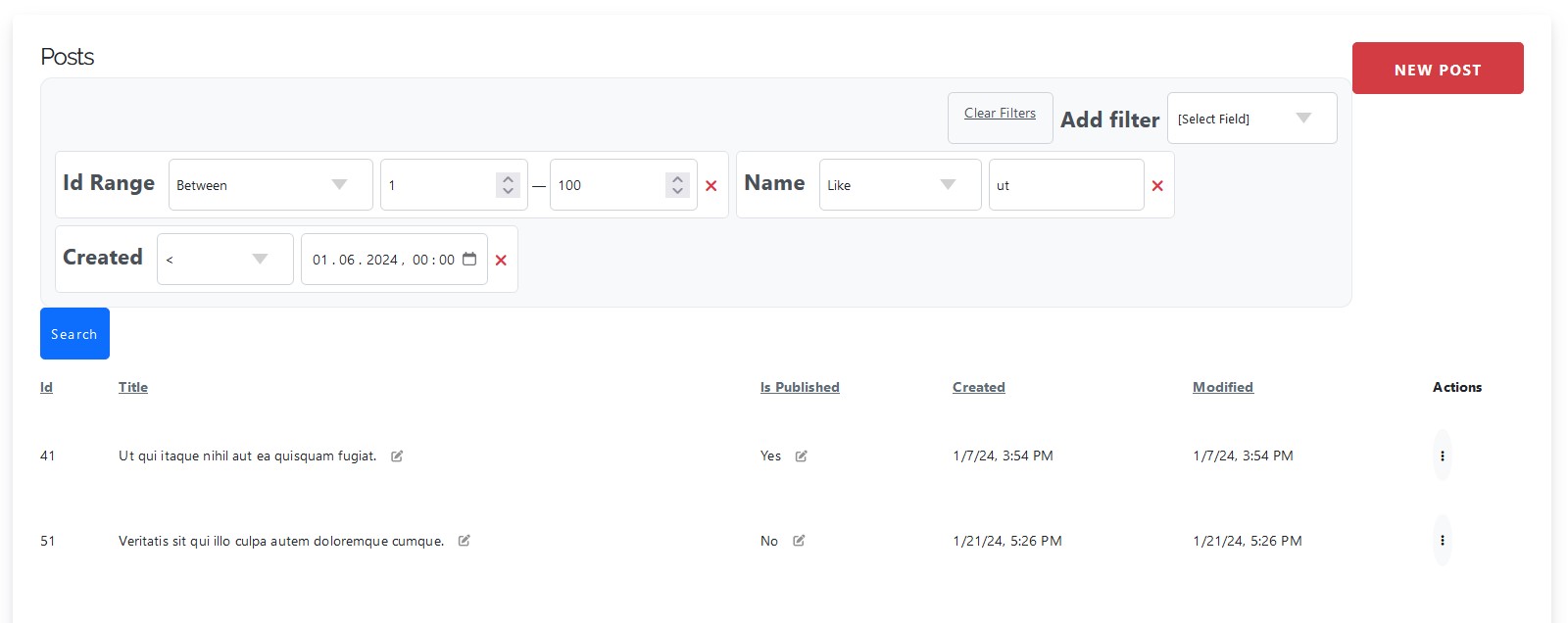
Let's walk through a complete example of setting up filters in a controller. This implementation demonstrates how to integrate search filters with our htmx application from previous articles.
Controller Setup
First, we need to initialize the PlumSearch filter component in our controller:
public function initialize(): void
{
    parent::initialize();
    $this->loadComponent('PlumSearch.Filter');
}
Implementing Search Filters
Here's a complete example of setting up filters in the controller's list method:
// /src/Controller/PostsController.php
protected function list()
{
    $query = $this->Posts->find();

    $manager = new Manager($this->request);
    $collection = $manager->newCollection();

    $collection->add('search', $manager->filters()
        ->new('string')
        ->setConditions(new \stdClass())
        ->setLabel('Search...')
    );

    $collection->add('name', $manager->filters()
        ->new('string')
        ->setLabel('Name')
        ->setCriterion(
            new OrCriterion([
                $manager->buildCriterion('title', 'string', $this->Posts),
                $manager->buildCriterion('body', 'string', $this->Posts),
            ])
        )
    );

    $collection->add('created', $manager->filters()
        ->new('datetime')
        ->setLabel('Created')
        ->setCriterion($manager->buildCriterion('created', 'datetime', $this->Posts))
    );

    $viewFields = $collection->getViewConfig();

    if (!empty($this->getRequest()->getQuery()) && !empty($this->getRequest()->getQuery('f'))) {
        $search = $manager->formatSearchData();
        $this->set('values', $search);

        $this->Posts->addFilter('search', [
            'className' => 'Multiple',
            'fields' => [
                'title', 'body',
            ]
        ]);
        $this->Posts->addFilter('multiple', [
            'className' => 'CakeDC/SearchFilter.Criteria',
            'criteria' => $collection->getCriteria(),
        ]);

        $filters = $manager->formatFinders($search);
        $query = $query->find('filters', params: $filters);
    }

    $this->set('viewFields', $viewFields);

    $posts = $this->paginate($this->Filter->prg($query), ['limit' => 12]);
    $this->set(compact('posts'));
}
Table Configuration
Enable the filterable behavior in your table class:
// /src/Model/Table/PostsTable.php
public function initialize(array $config): void
{
    // ...
    $this->addBehavior('PlumSearch.Filterable');
}
View Implementation
In your view template, add the necessary assets and initialize the search filter:
<!-- templates/Posts/index.php -->
<?= $this->Html->css('CakeDC/SearchFilter.inline'); ?>
<?= $this->Html->script('CakeDC/SearchFilter.vue3.js'); ?>
<?= $this->Html->script('CakeDC/SearchFilter.main.js', ['type' => 'module']); ?>
<?= $this->element('CakeDC/SearchFilter.Search/v_templates'); ?>

<div id="search">
    <?= $this->Form->create(null, [
        'id' => 'search-form',
        'type' => 'get',
        'hx-get' => $this->Url->build(['controller' => 'Posts', 'action' => 'index']),
        'hx-target' => "#posts",
    ]); ?>
    <div id="ext-search"></div>
    <?= $this->Form->button('Search', ['type' => 'submit', 'class' => 'btn btn-primary']); ?>
    <?= $this->Form->end(); ?>
</div>

<script>
    window._search = window._search || {};
    window._search.fields = <?= json_encode($viewFields) ?>;
    var values = null;
    <?php if (!empty($values)): ?>
        window._search.values = <?= json_encode($values) ?>;
    <?php else: ?>
        window._search.values = {};
    <?php endif; ?>
</script>
JavaScript Integration
Finally, add the necessary JavaScript to handle the search filter initialization and htmx interactions:
<!-- /templates/Posts/index.php -->
<script>
function setupTable(reload) {
    if (reload) {
        setTimeout(function () {
            window._search.app.unmount()
            window._search.createMyApp(window._search.rootElemId)
        }, 20);
    }
}

document.addEventListener('DOMContentLoaded', function() {
    window._search.createMyApp(window._search.rootElemId)
    setupTable(false);
    htmx.on('htmx:afterRequest', (evt) => {
        setupTable(true);
    })
});
</script>
The combination of CakePHP's search filter plugin with htmx provides a modern, responsive search experience with minimal JavaScript code.
Frontend Vue App Widgets
The plugin provides several Vue.js widgets for different filter types:
- SearchInput: For basic text input
- SearchInputNumericRange: For basic text input
- SearchSelect, Select2, SearchSelectMultiple: For dropdown selections
- SearchInputDate, SearchInputDateRange: For date picking
- SearchInputDateTime, SearchInputDateTimeRange: For datetime picking
- SearchLookupInput: For autocomplete functionality
- SearchMultiple: For multiple selections
- SearchSelectMultiple: For multiple selections
These widgets are automatically selected based on the filter type you define in your controller.
Custom Filters and Custom Widgets
The CakeDC Search Filter plugin can be extended with custom filters and widgets. Let's walk through creating a custom range filter that allows users to search between two numeric values.
Custom Filter Class
First, create a custom filter class that extends the AbstractFilter:
// /src/Controller/Filter/RangeFilter.php
<?php
declare(strict_types=1);

namespace App\Controller\Filter;

use Cake\Controller\Controller;
use CakeDC\SearchFilter\Filter\AbstractFilter;

class RangeFilter extends AbstractFilter
{
    protected array $properties = [
        'type' => 'range',
    ];

    protected object|array|null $conditions = [
        self::COND_BETWEEN => 'Between',
    ];
}
Custom Criterion Implementation
Create a criterion class to handle the range filtering logic:
// /src/Model/Filter/Criterion/RangeCriterion.php
<?php
declare(strict_types=1);

namespace App\Model\Filter\Criterion;

use Cake\Database\Expression\QueryExpression;
use Cake\ORM\Query;
use CakeDC\SearchFilter\Filter\AbstractFilter;
use CakeDC\SearchFilter\Model\Filter\Criterion\BaseCriterion;

class RangeCriterion extends BaseCriterion
{
    protected $field;

    public function __construct($field)
    {
        $this->field = $field;
    }

    public function __invoke(Query $query, string $condition, array $values, array $criteria, array $options): Query
    {
        $filter = $this->buildFilter($condition, $values, $criteria, $options);
        if (!empty($filter)) {
            return $query->where($filter);
        }

        return $query;
    }

    public function buildFilter(string $condition, array $values, array $criteria, array $options = []): ?callable
    {
        return function (QueryExpression $exp) use ($values) {
            if (!empty($values['from']) && !empty($values['to'])) {
                return $exp->between($this->field, $values['from'], $values['to']);
            }
            return $exp;
        };
    }

    public function isApplicable($value, string $condition): bool
    {
        return !empty($value['from']) || !empty($value['to']);
    }
}
Controller Integration
Update your controller to use the custom range filter:
// /src/Controller/PostsController.php
protected function list()
{
    // ...

    $manager = new Manager($this->request);
    $manager->filters()->load('range', ['className' => RangeFilter::class]);
    $collection = $manager->newCollection();

    $collection->add('id', $manager->filters()
        ->new('range')
        ->setLabel('Id Range')
        ->setCriterion($manager->buildCriterion('id', 'integer', $this->Posts))
    );

    // ...
}
Custom Vue.js Widget
Create a custom Vue.js component for the range input. It consists of two parts, widget template and widget component:
<!-- /templates/Posts/index.php -->
<script type="text/x-template" id="search-input-range-template">
<span class="range-wrapper d-flex">
<input
type="number"
class="form-control value value-from"
:name="'v[' + index + '][from][]'"
v-model="fromValue"
@input="updateValue"
:placeholder="field.fromPlaceholder || 'From'"
/>
<span class="range-separator d-flex align-items-center"> — </span>
<input
type="number"
class="form-control value value-to"
:name="'v[' + index + '][to][]'"
v-model="toValue"
@input="updateValue"
:placeholder="field.toPlaceholder || 'To'"
/>
</span>
</script>
<script>
const RangeInput = {
template: "#search-input-range-template",
props: ['index', 'value', 'field'],
data() {
return {
fromValue: '',
toValue: '',
};
},
methods: {
updateValue() {
this.$emit('change-value', {
index: this.index,
value: {
from: this.fromValue,
to: this.toValue
}
});
}
},
mounted() {
if (this.value) {
this.fromValue = this.value.from || '';
this.toValue = this.value.to || '';
}
},
watch: {
value(newValue) {
if (newValue) {
this.fromValue = newValue.from || '';
this.toValue = newValue.to || '';
} else {
this.fromValue = '';
this.toValue = '';
}
}
}
};
<script>Component Registration
Register the custom widget in the Vue.js app. Implement the register function to register the custom widget, and the setupTable function to setup the table after a htmx request.
// /templates/Posts/index.php
function register(app, registrator) {
    app.component('RangeInput', RangeInput);
    registrator('range', function(cond, type) { return 'RangeInput';});
}

function setupTable(reload) {
    if (reload) {
        setTimeout(function () {
            window._search.app.unmount()
            window._search.createMyApp(window._search.rootElemId, register)
        }, 20);
    }
}

document.addEventListener('DOMContentLoaded', function() {
    window._search.createMyApp(window._search.rootElemId, register)
    setupTable(false);
    htmx.on('htmx:afterRequest', (evt) => {
        setupTable(true);
    })
});
</script>
This implementation creates a custom range filter that allows users to search for records within a specified numeric range. The filter consists of three main components:
- A custom filter class (
RangeFilter) that defines the filter type and conditions - A custom criterion class (
RangeCriterion) that implements the filtering logic - A Vue.js component (
RangeInput) that provides the user interface for entering range values - A registration function to register the custom widget, and the
setupTablefunction to setup the table after a htmx request.
Demo Project for Article
The examples used in this article are located at https://github.com/skie/cakephp-htmx/tree/4.0.0 and available for testing.
Conclusion
The CakeDC Search Filter plugin provides a robust solution for implementing advanced search functionality in CakePHP applications. Its combination of flexible backend filtering and modern frontend components makes it an excellent choice for any CakePHP project. The plugin's extensibility allows for customization to meet specific project needs, while its built-in features cover most common search scenarios out of the box.
Whether you need simple text searches or complex multi-criteria filtering, the Search Filter plugin offers the tools to build user-friendly search interfaces.
This article is part of the CakeDC Advent Calendar 2024 (December 21th 2024)
Need help with this in your own CakePHP app?
Talk to a CakePHP expert